
模型路由

以 Markdown 格式查看

当你的应用应调用稳定的路由 ID,而由 OpenModels 在背后处理模型选择和供应商路由时,请使用模型路由。

路由 ID 形如 route:coding-agent。请在你已用于普通模型 ID 的同一个 POST /chat/completions 请求结构中,把它作为 model 值传入。

何时使用模型路由

当你想要实现以下目标时,请使用模型路由:

  • 不修改应用代码即可更改路由逻辑。
  • 将多个模型归到一个稳定 ID 后面。
  • 当首选模型不可用时跨模型回退。
  • 从应用中在 fastbalanceddeep 模式之间切换。

如果你只想把某个普通模型 ID 的单个请求固定到某个供应商,请改用 Chat Completions 页面中的 route.provider

创建路由

打开 OpenModels 控制台,进入 Routes,然后点击 Create route

  1. 为路由命名。OpenModels 会生成 route:coding-agent 这样的路由 ID。
  2. 选择该路由可以使用的模型。
  3. 选择路由规则。
  4. 在路由处于 Active 状态时保存。

路由 ID 创建后不能更改。请从 Routes 表或路由详情面板中复制它。
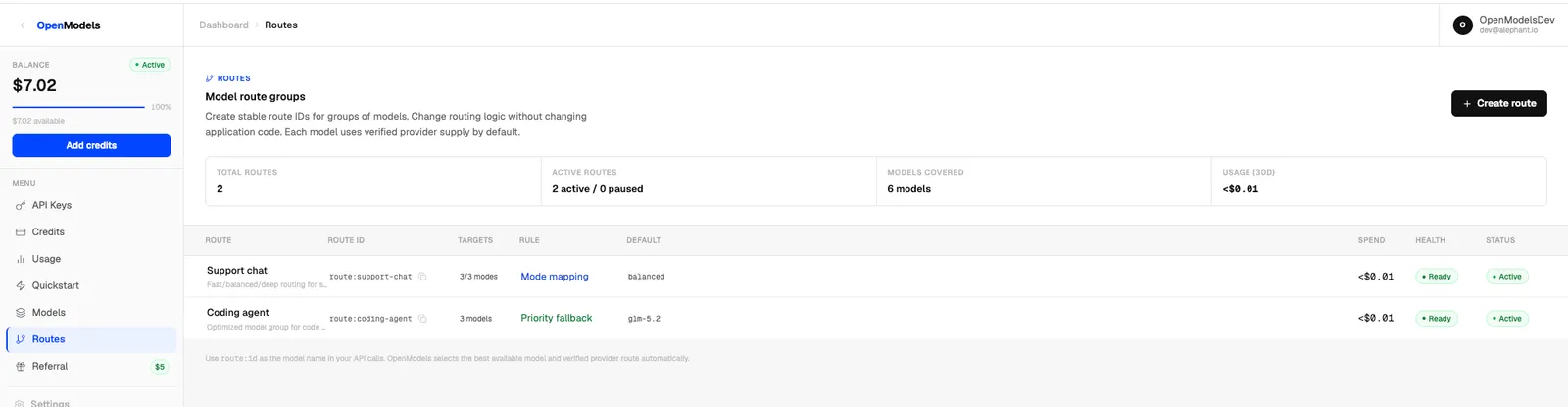
显示路由 ID、规则、健康状态和状态的 OpenModels 路由表

优先级回退

优先级回退会按顺序使用模型。如果第一个模型不可用,OpenModels 会回退到下一个模型。
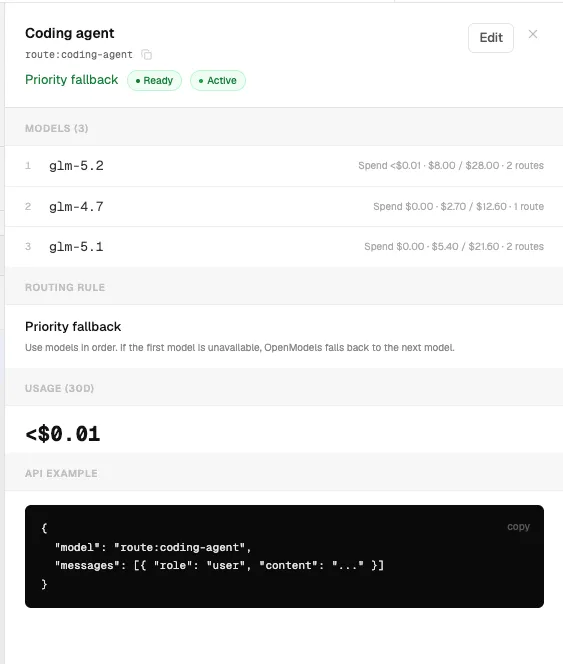
优先级回退路由的路由详情面板

{
"model": "route:coding-agent",
"route": { "provider": "<provider-for-this-route>" },
"route_mode": "balanced",
"messages": [
{
"role": "user",
"content": "Review this patch and summarize the risk."
}
]
}

模式映射

模式映射让你的应用无需更改路由 ID 即可在 fastbalanceddeep 之间切换。如果省略 route_mode,OpenModels 会使用 balanced 模式。
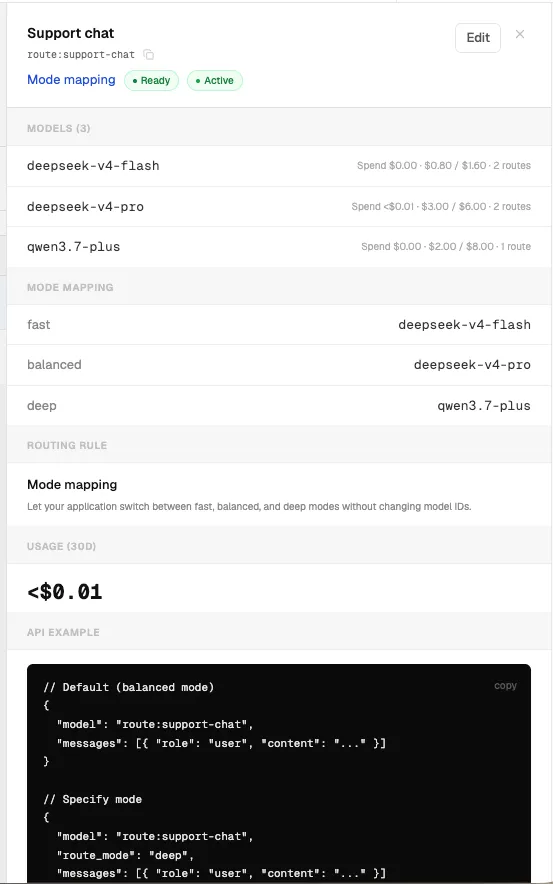
模式映射路由的路由详情面板

默认 balanced 模式:

{
"model": "route:support-chat",
"route": { "provider": "<provider-for-this-route>" },
"route_mode": "balanced",
"messages": [
{
"role": "user",
"content": "Summarize this customer conversation."
}
]
}

指定模式:

{
"model": "route:support-chat",
"route": { "provider": "<provider-for-this-route>" },
"route_mode": "deep",
"messages": [
{
"role": "user",
"content": "Summarize this customer conversation and list follow-up actions."
}
]
}

受支持的 route_mode 值为 fastbalanceddeep

cURL

curl https://api.getopenmodels.com/v1/chat/completions \
-H "Authorization: Bearer $OM_API_KEY" \
-H "Content-Type: application/json" \
-d '{
"model": "route:coding-agent",
"route": { "provider": "<provider-for-this-route>" },
"route_mode": "balanced",
"messages": [
{
"role": "user",
"content": "Explain this stack trace in one paragraph."
}
]
}'

备注

  • 使用 route:* ID 作为 model 值。
  • 继续使用正常的 OpenModels 基础 URL 和 API 密钥。
  • 如果路由组应在内部选择供应商,请移除 route.provider
  • 已暂停的路由不适合生产流量。
  • 每个路由的用量会显示在控制台的 Routes 页面中。